RevOps teams spend 40%+ of their time inside Salesforce. It's the system of record for pipeline, the source of truth for forecasting, and the platform that every other tool in your stack needs to integrate with. That makes it the most important and most frustrating tool in revenue operations.
⚡
The Verdict: Salesforce is the CRM you pick when your processes are complex enough to justify the overhead. It can do almost anything, but that flexibility comes with a permanent tax: you'll need dedicated admin resources, constant data hygiene work, and a strategy for managing the AppExchange sprawl that accumulates over time. For enterprise RevOps, there's no real alternative. For everyone else, the total cost of ownership deserves hard scrutiny.
150K+
Customers Worldwide
#1
CRM Market Position
21%
CRM Market Share
$25-300
Per User / Month
Company Overview
What Is Salesforce, from a RevOps Seat?
Salesforce is the dominant enterprise CRM, and for RevOps teams, it's the center of gravity. Every workflow, every report, every integration either starts or ends in Salesforce. The platform's data model is infinitely customizable, which is both the appeal and the problem.
On paper, Salesforce gives you everything: objects, fields, flows, reports, dashboards, automation, an ecosystem of 7,000+ AppExchange apps, and an API that connects to anything. In practice, that flexibility creates a maintenance burden that never goes away. Every custom field is a future data quality problem. Every Flow is a potential point of failure. Every AppExchange install is another vendor to manage.
The RevOps relationship with Salesforce is one of constant negotiation. You need the platform's power, but you're also its full-time caretaker. And Salesforce knows it. The switching costs are enormous, which gives them pricing leverage at renewal time.
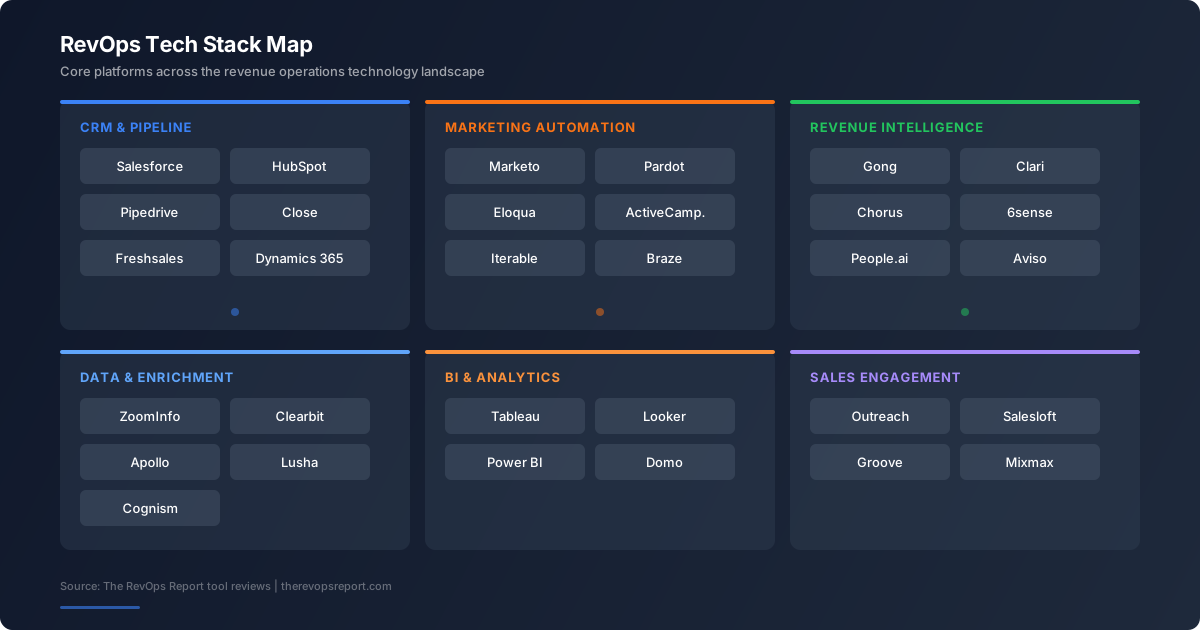
The integration ecosystem is what keeps Salesforce at the center. Every SEP, every marketing automation tool, every BI platform has a Salesforce connector. That gravitational pull means your entire GTM stack is organized around SFDC data. Outreach writes activities back to Salesforce. HubSpot syncs leads into it. Clari pulls pipeline from it. When Salesforce is clean, the whole stack works. When it's messy, every downstream tool inherits the mess.
Salesforce's 2025-2026 push into AI (Einstein Copilot, Data Cloud, predictive forecasting) adds a new layer for RevOps to evaluate. The AI features require Unlimited or Einstein 1 tiers, which means $330-500/user/month. Early adoption reports are mixed: the predictions improve with data quality, which circles back to the same governance problem. If your org data is clean, Einstein adds value. If it's not, you're paying premium prices for unreliable predictions.
💡
RevOps Reality Check
If you don't have at least one dedicated Salesforce admin (or a RevOps person who spends 50%+ of their time on SFDC), the platform will become a liability, not an asset. Unmaintained Salesforce orgs degrade fast.
Pricing
What Salesforce Costs
Salesforce pricing is straightforward on paper, confusing in practice. The per-user cost is just the starting point. The real expense is in add-ons, AppExchange apps, and the admin headcount required to keep it running.
Plan
Price
What’s Included
Starter Suite
$25/user/mo
Basic CRM, lead and opportunity management, email integration
Pro Suite
$100/user/mo
Customization, forecasting, quoting, API access
Enterprise
$165/user/mo
Advanced automation, workflow rules, approval processes Most Common
Unlimited
$330/user/mo
Premier support, sandbox, AI features, Data Cloud
Einstein 1 Sales
$500/user/mo
Everything plus Copilot, performance management, revenue intelligence
Keep In Mind
Annual contracts required on all plans. Monthly billing is not an option for most editions.
CPQ, Pardot/Marketing Cloud, and Data Cloud are separate products with separate pricing. Budget accordingly.
AppExchange apps often carry per-user/month fees that compound across your org. Track these carefully.
Renewal increases of 7-10% are standard. Negotiate hard, and start the conversation 6 months before expiry.
Core Features
What Salesforce Does Well
📈
Customizable Data Model
Objects, fields, record types, page layouts. Build any data architecture you need. The trade-off is that complexity compounds.
⚡
Flow Automation
Flows replaced Process Builder and Workflow Rules. Powerful but can get tangled fast if you don't govern them. Document everything.
📊
Reports & Dashboards
Flexible reporting with cross-object joins, summary formulas, and scheduled delivery. The UI improved with Lightning, but power users still hit walls.
🔒
Enterprise Permissions
Profiles, permission sets, sharing rules, org-wide defaults. Granular access control that enterprise compliance teams require.
🌍
AppExchange Ecosystem
7,000+ apps for every use case. The ecosystem is unmatched. The downside: each app is another integration to manage and another vendor to pay.
🔌
API & Integration
REST and SOAP APIs, plus middleware connectors. Every tool in the GTM stack integrates with Salesforce. That's its gravitational pull.
Limitations
Where Salesforce Falls Short
No tool is perfect. Here are the real trade-offs you should know about:
Admin Overhead Is a Permanent Cost
Salesforce doesn't run itself. Every org needs someone managing fields, flows, permissions, page layouts, and data quality. For enterprise, that's a team.
"We hired a Salesforce admin and their backlog filled up in the first week. The platform demands constant attention or things start breaking."
RevOps Director, Series C SaaS (200 reps)
Reporting Has a Ceiling
Salesforce reports are good for operational dashboards. They're not good for deep analysis. Cross-object reporting has limits, calculated fields are.
Data Quality Requires Constant Vigilance
The flexibility that makes Salesforce powerful also makes data entropy inevitable. Free-text fields get messy. Picklists drift.
"Our Salesforce org has 340 custom fields on the Account object. Nobody knows what half of them do. That's the real Salesforce experience."
Sr. RevOps Manager, Enterprise SaaS
Ecosystem Lock-In Is Real
Once your processes, integrations, and tribal knowledge live in Salesforce, switching costs become prohibitive.
Evaluation
Pros and Cons Summary
+ The Good Stuff
Unmatched customization. You can model any sales process if you invest the setup time.
Deepest integration ecosystem in CRM. Every GTM tool connects to Salesforce.
Enterprise-grade security and compliance (SOC 2, HIPAA, FedRAMP options).
AppExchange fills gaps fast, even if it adds vendor management overhead.
Flow automation is powerful enough for most RevOps workflow needs.
Market standard. Hiring Salesforce-skilled ops people is easier than for any other CRM.
- The Problems
Requires dedicated admin resources. Budget for at least one FTE.
Licensing costs compound with add-ons, AppExchange, and per-user fees.
Reporting hits a ceiling. Most teams need a BI tool for advanced analysis.
Data quality degrades without active governance. This is a permanent workload.
UI/UX still feels heavy compared to modern alternatives.
What's our total Salesforce spend including AppExchange? Audit every managed package, per-user add-on, and API cost. Most orgs undercount by 30-50%.
How many custom fields do we have, and who owns the schema? Field bloat is the leading cause of data quality problems. If nobody owns the schema, nobody is governing it.
What's our Flow governance process? Ungoverned Flows create silent failures. Every Flow should have an owner, documentation, and error handling.
What's our Salesforce admin coverage? Calculate admin-to-user ratio. Below 1:75 and you're under-resourced. Above 1:200 and things are breaking.
When is our renewal, and what's our negotiation strategy? Start 6 months early. Benchmark pricing against peers. Know exactly which features you're using and which you aren't.
What happens to our data and workflows if we leave? Map your switching costs honestly. Custom objects, Flows, integrations, tribal knowledge. This is your lock-in surface area.
Are we getting value from Einstein AI features, or just paying for them? Einstein requires clean data and Unlimited/Einstein 1 licensing ($330-500/user). Track actual AI feature usage against cost. Most orgs pay for Einstein but only 20-30% of reps engage with it.
What's our admin-to-user ratio, and is it sustainable? Industry benchmark is 1 admin per 75 users for healthy orgs. Below that ratio, you're under-resourced and accumulating technical debt. Factor in contractor or consultant costs if FTE headcount is capped.
FAQ
Frequently Asked Questions
How do RevOps teams use Salesforce?
RevOps teams use Salesforce as the system of record for pipeline management, forecasting, territory assignment, and deal inspection. Day-to-day, that means managing Flows for lead routing and stage transitions, maintaining custom fields and picklists for clean reporting, building dashboards for pipeline reviews, and governing the data model so downstream tools (Outreach, Clari, marketing automation) get reliable data. Most RevOps teams spend 40-60% of their operational hours inside Salesforce or maintaining it.
Is Salesforce good for RevOps?
Salesforce is the most capable CRM for RevOps, but that capability comes with permanent overhead. The customizable data model means you can build any revenue process. Flows handle complex automation. The API connects every tool in your stack. The catch: you need at least one dedicated admin (ideally more above 100 users), and data quality requires constant governance. Salesforce is unmatched for enterprise RevOps. For teams under 50 reps without admin resources, the maintenance burden outweighs the flexibility.
How much does Salesforce cost?
Listed pricing starts at $25/user/month (Starter Suite) and goes to $500/user/month (Einstein 1 Sales). Most RevOps teams land on Enterprise ($165/user/month) or Unlimited ($330/user/month). But per-user licensing is only 50-60% of the real cost. Add AppExchange apps ($10-50/user/month each, and most orgs run 5-15 apps), admin headcount ($80-120K/year FTE), and consulting for complex projects. A 100-user Enterprise org realistically costs $250-350K/year all-in. Renewals increase 7-10% annually.
What are common Salesforce limitations for RevOps?
Four pain points hit every RevOps team: reporting ceilings (cross-object joins are limited, forcing exports to BI tools for deep analysis), data entropy (custom fields accumulate, picklists drift, duplicates multiply without active governance), Flow complexity (ungoverned automation creates silent failures and debugging nightmares), and renewal leverage (switching costs are so high that Salesforce controls pricing conversations). The platform does almost everything, but nothing maintains itself.
Salesforce vs HubSpot for RevOps?
Salesforce wins on depth: more customizable data model, better enterprise permissions, deeper integration ecosystem, and more mature automation. HubSpot wins on unified simplicity: marketing and sales share one data model, admin burden is 70% lower, and Operations Hub gives RevOps dedicated tooling without Salesforce's overhead. The decision point is team size and complexity. Above 100 reps with complex processes, Salesforce. Below 100 with marketing-sales alignment needs, HubSpot. The migration cost in either direction is 3-6 months of work.
The RevOps Report’s Bottom Line
Salesforce is the enterprise CRM for a reason. Its customization depth, integration ecosystem, and market dominance make it the default choice for complex RevOps teams. But that power comes with a real and ongoing cost: admin headcount, data governance, AppExchange management, and renewal negotiations that favor Salesforce. If your processes justify the overhead, no other CRM matches it. If they don't, you're paying enterprise prices for a tool you're underusing.
But know the trade-offs:
Budget for admin headcount as a line item, not an afterthought.
AppExchange sprawl adds up. Audit annually and cut what you're not using.
Plan your reporting stack. Salesforce reports alone won't satisfy your exec team's analysis needs.
Start renewal negotiations early. Six months out, minimum.
About the Author
Rome Thorndike is VP of Revenue at Firmograph.ai, where he builds AI agents that analyze GTM data for revenue leaders. His career spans enterprise sales at Salesforce and Microsoft, helping scale Sequoia-backed Snapdocs from Series A through Series D, and leading sales at Datajoy through its acquisition by Databricks. Rome holds an MBA from UC Berkeley Haas with a focus on statistical analysis and machine learning.
Disclosure: The RevOps Report may receive affiliate compensation from tools mentioned here. Our analysis is independent. Every source is linked. Every claim is verifiable.
Get RevOps Intel
Weekly market data + quarterly State of RevOps reports. Free.